FAQ
Everything about buying, selling, messaging, FFL transfers, and memberships on TGX. Legal questions live on our California Gun Laws page.
Post a Gun
Sell a firearm
Membership
Unlock messaging
Find an FFL
Transfer sites
Community Board
Members only
Getting Started
What is The Gun Exchange USA (TGX)?
TGX is a secure, local marketplace for buying and selling firearms across Southern California — the Antelope Valley, Victor Valley, Kern County, and surrounding areas. We connect verified buyers and sellers and coordinate the legal FFL transfer. We never handle the firearm or the sale money — we are a listing and connection service only.
Where does TGX operate?
We launched in the Antelope Valley and are expanding across Southern California and the West Coast, with plans to go nationwide over time. For now, all transfers are in-state and in-person at a licensed California FFL.
What does it cost?
Launch month: through October 31st, every listing posts free and every member gets the full Elite experience — no card needed. Normal pricing returns in November: sellers pay a one-time listing fee when they post a listing: $25 for a 30-day gun listing — every new member gets free signup credits that cover their first gun listing (Basic: 1, Elite: 3). Gear and military surplus listings are always free, and parts and ammo are free under $50 ($5 at $50–$99, $10 at $100+; Elite members post them free). A single $10 extension is available to keep a listing fresh; after that, you repost at full price. New members get their first month free (Basic) or for $10 (Elite); after that, a membership that unlocks messaging with sellers is $10/month (Basic) or $20/month (Elite). TGX takes no cut of any firearm sale — every dollar of the gun changes hands at the FFL.
Is there merch?
Yes — we run a Printful-powered merch store for branded TGX gear. You can shop the merch store directly through the site; orders are printed and shipped on demand.
What can I list on TGX?
Five categories: firearms, parts, gear, ammunition, and military surplus. Gun listings are $25 for a 30-day run (your free signup credit covers your first — Basic gets 1, Elite gets 3); gear and surplus are always free, and parts and ammo are free under $50 ($5 at $50–$99, $10 at $100+). Ammo listings designate FFL pickup sites — California requires ammunition transfers through a licensed vendor — and each ammo listing covers a single caliber. Post a listing to get started.
What is the Founding Fifty?
Our first 50 members claim a permanent, numbered founding slot plus their Founding Fifty emblem on the member card and the standard signup credits (Basic: 1 free gun listing; Elite: 3). Through October 31st, claiming your spot is free and no card is needed — in November, you pick your plan (Basic $10/mo or Elite $20/mo) if you want to keep going. Visit the Founding Fifty page to claim your spot.
I'm an FFL — is there a partner program?
Yes. Licensed dealers get a free 30-day partner trial: a free month's membership plus unlimited free listings — firearms, parts, gear, ammo, and surplus, every fee waived. We never take a commission; buyers and sellers meet at your counter and your transfer fee is yours. Request your free partner trial. Stores outside our active regions can join the partner waitlist there to be notified when the program opens in their area.
Buying
How do I buy a gun on TGX?
Browse active listings, then become a buyer member (free through October 31st, then $10/month) to message sellers directly through the platform. Once you and the seller agree, you both meet at a local FFL to complete the legal transfer — background check, 10-day wait, and all. The firearm and payment never change hands outside the FFL.
Why do I need a buyer membership to message sellers?
Memberships keep the community accountable and fund the platform. A membership also lets us verify who you are, protect sellers from spam, and route all communication through in-app messaging instead of exposing your personal contact info publicly.
How does messaging work — and why no phone numbers?
All buyer–seller communication happens inside TGX. We intentionally replace public phone numbers and emails with private in-app messaging so your contact info stays yours until you choose to share it. You'll get email or phone alerts when you receive a new message — manage them from your Profile & Preferences page.
How do FFL transfers work through the site?
When you post a listing, you choose which local FFL transfer sites you're willing to use. Buyers see those options on the listing and can find them on our Transfer Sites map. The actual transfer — DROS, background check, and the 10-day waiting period — is handled by that licensed dealer in person.
What is the buyer ownership acknowledgment?
When a seller accepts your offer on a firearm, you confirm a short checklist of California ownership requirements — 21+, valid FSC (or an exemption), background check, and the 10-day waiting period — before the deal locks and your spot is held. It keeps every buyer squared away on exactly what the FFL will require at the counter.
How do offers and reservations work?
Buyers can make an offer on any listing; the seller can accept, counter, or decline. When a firearm offer is accepted, the buyer first confirms the short California ownership checklist, then can reserve the listing — the seller pulls it from general sale and holds it for 72 hours. From there you schedule the FFL transfer through the site: the seller proposes up to three dates and the FFL site, the buyer picks one, and both parties leave a rating after the transfer is done.
Can I filter listings by region or category?
Yes. The marketplace filters by category — firearms, parts, gear, ammo, and surplus — and by region. TGX launched in the Antelope Valley and is expanding region by region, so new areas appear in the region filter as they open. Browse listings.
Selling & Listing
How do I sell a gun on TGX?
Create a listing for a one-time $25 fee for a 30-day run. Add up to 6 photos, the make/model/caliber, condition, and the FFL transfer sites you're willing to use. See Tips for a Great Listing for guidance. Our automated compliance checker screens every listing; if it can't confirm a listing is legal, it's held for a quick manual review before going live.
Can I extend an expiring listing?
Yes — once. A single $10 extension is offered to keep your listing active and fresh. After that, you repost at the full listing fee so inventory stays current for buyers.
What is the compliance checker?
Every listing is screened against California's assault-weapon and feature restrictions before it can go live. Listings the checker can't confidently clear are held for a manual admin review, so nothing illegal reaches the public marketplace. The full feature restrictions are on our California Gun Laws page.
Trust & Safety
How does seller / buyer verification work?
Sellers upload their FSC, military retiree ID, or CCW documentation when posting a listing. Our admin team reviews and approves verifications. This helps keep the marketplace trusted and compliant.
What happens to my verification document after I'm approved?
Your document is stored in access-controlled private storage and is viewable only by our review team through short-lived, expiring links. Once your verification is approved, the stored scan is automatically deleted per our retention policy — or 90 days after submission if it wasn't approved. We keep only your verification status and the document's expiry date. The document itself is never shared with anyone; the FFL verifies your eligibility in person at transfer. Details in our Privacy Policy.
How do I report a listing or a problem?
On any listing page, use the "Report this listing" link to flag something inappropriate, unsafe, or rule-breaking. For other issues — user conduct, payment concerns, or safety matters — use our Contact form or file a complaint and an admin will review it.
Is my information secure?
We use secure authentication, private messaging, and admin-only access to sensitive data like verification documents and seller contact info. We never display your phone number or email publicly on a listing — see our Privacy Policy for details.
What is the community board?
The community board is a members-only space for discussion, questions, and California law updates. Admins can pin important notices and post law updates. Posts can be flagged by members and are reviewed by our moderation team.
App & Notifications
Is there a mobile app?
We don't have an app in the Apple App Store or Google Play — but you can install TGX straight to your phone's home screen. On iPhone, open the site in Safari and tap Share → Add to Home Screen; on Android, open it in Chrome and tap the menu → Add to Home Screen (or Install App). It works just like an app: full-screen browsing, the TGX icon on your home screen, quick one-tap access — and push notifications (see the next question). See the full step-by-step install guide.
How do I get push notifications?
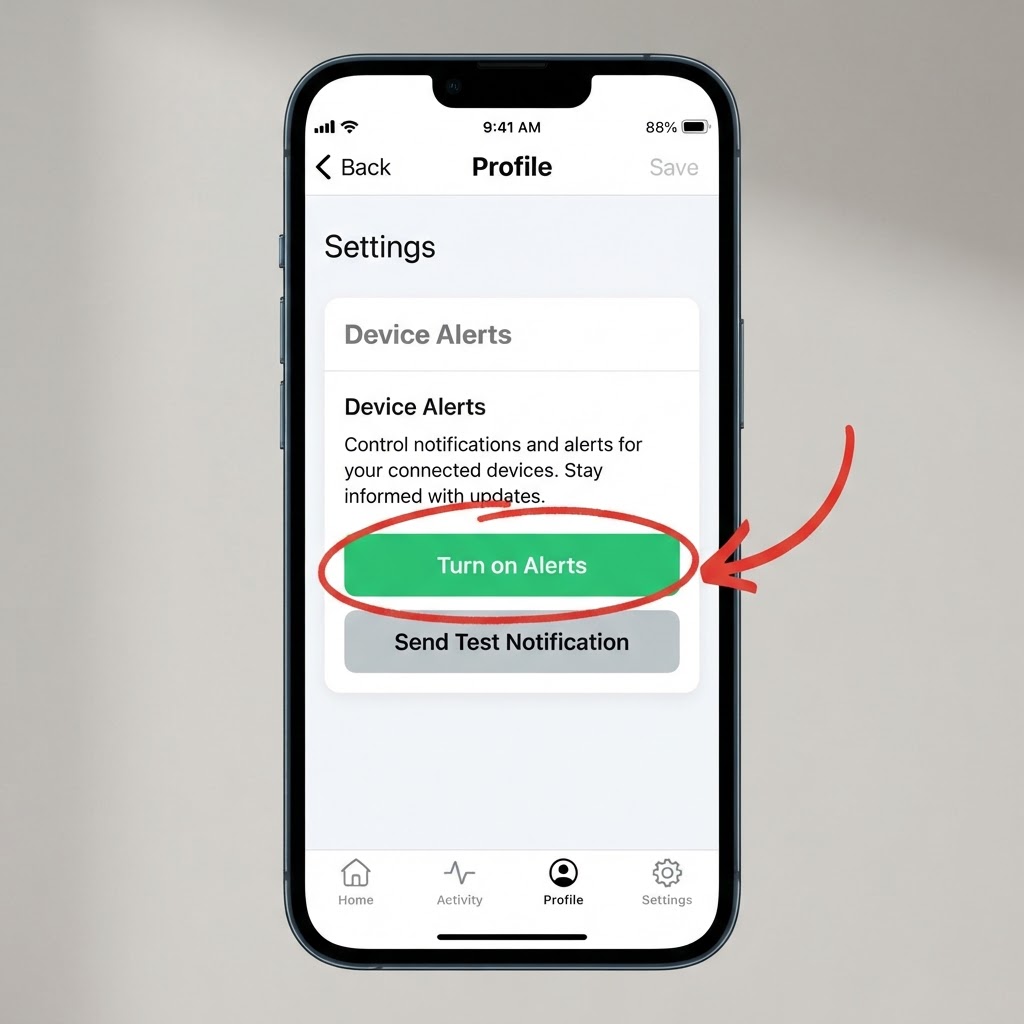
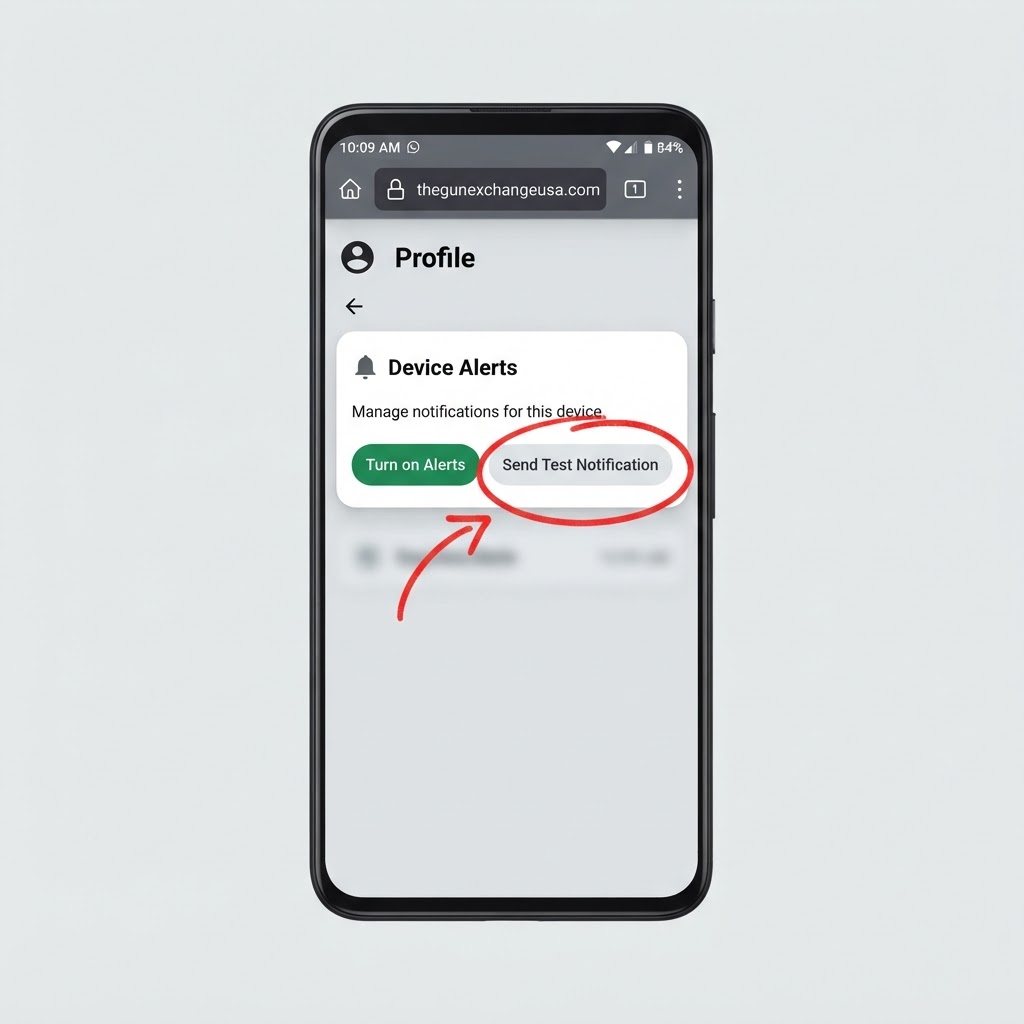
Turn them on from your Profile page: log in, open Profile, and hit "Turn on Alerts" in the Device Alerts card. You'll get alerts pushed straight to your phone for new listings from sellers you follow, offers and counter-offers, new messages, and FFL transfer updates — no waiting on an email. iPhone requirement: Apple only allows web notifications after you add TGX to your Home Screen (Safari → Share → Add to Home Screen, iOS 16.4 or newer) and open it from there. On Android it works right in Chrome — and if alerts don't pop up after you install TGX to your home screen, press and hold the TGX icon, tap "Site settings," make sure Notifications and Sound are allowed, then open the TGX app's notification settings and turn on "Allow notifications" and "Sound and vibration." Use the "Send Test Notification" button to confirm it's working, and you can turn alerts off anytime from the same card. See the full step-by-step push alerts guide.